Pixelforge
fersab.github.io/pixelforge/ →A 3D renderer from the first pixel to GPU raytracing — zero libraries, zero frameworks
WHAT IT SOLVES
Most AI-assisted projects are wrappers and CRUD apps. This author wanted to prove Claude Code can handle real algorithmic heavy lifting — real-time graphics and low-level math
WHY IT'S INTERESTING
Deliberately chose the hard path
No WebGL, no Three.js — starts from raw Canvas pixel manipulation and builds a full rendering pipeline from scratch. The author says he wanted something that 'takes you back to the demoscene.' This isn't product thinking, it's craft
Three renderers + BVH acceleration
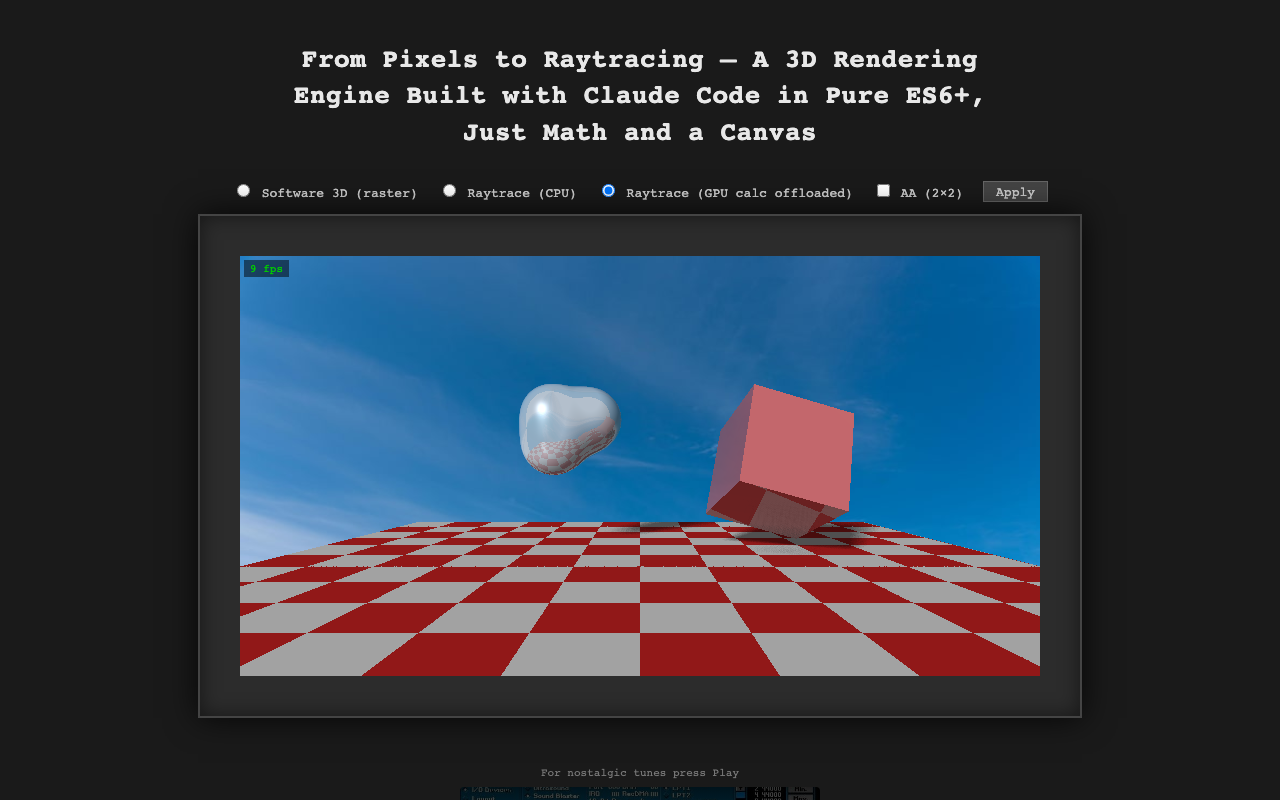
Software rasterizer, CPU raytracer, GPU raytracer with BVH acceleration and 2×2 AA — three full pipelines in one pure ES6+ project. BVH (Bounding Volume Hierarchy) is serious CG math, not tutorial-grade stuff
「"Most AI-assisted projects you see today are LLM wrappers, CRUD apps, or a handful of frameworks stitched together with API calls. I wanted to push Claude Code in a different direction — heavy algorithmic work, real-time math, and the kind of low-level graphics programming that takes you back to the demoscene"」
TECH GUESS
Pure ES6+ JavaScript, Canvas API pixel ops, WebGPU or compute shaders for GPU raytracing offload
DEEP DIVE
Pixelforge: A Hardcore Experiment in Building a 3D Renderer with Claude Code
In the era of AI-assisted programming, most projects are LLM wrappers or CRUD apps. Pixelforge, a 3D rendering engine in pure ES6+ JavaScript, breaks this mold. Created by fersab, it starts from the first pixel and goes to GPU raytracing without any libraries or frameworks. The project appeared on HN with 2 points and 1 comments, yet it embodies a significant technical endeavor. It's not about building a product, but about craftsmanship—pushing the limits of what AI can do in low-level graphics programming.
Developer Motivation: Proving AI Can Handle Heavy Lifting
fersab stated in the HN post: "Most AI-assisted projects you see today are LLM wrappers, CRUD apps, or a handful of frameworks stitched together with API calls. I wanted to push Claude Code in a different direction — heavy algorithmic work, real-time math, and the kind of low-level graphics programming that takes you back to the demoscene." The demoscene, a subculture from the 1980s, focuses on creating visual effects on constrained hardware, and Pixelforge channels this spirit. The developer chose the hardest path: no WebGL, no Three.js, starting from Canvas pixel manipulation to build a complete rendering pipeline. This reflects a personal quest to use AI tools for technical exploration, not just quick outputs.
Technical Implementation: Three Pipelines and BVH Acceleration
Pixelforge's core achievement is implementing three complete rendering pipelines: software rasterization, CPU raytracing, and GPU raytracing. The GPU raytracing uses BVH (Bounding Volume Hierarchy) acceleration with 2×2 antialiasing, achieving 9 fps. BVH is a serious computer graphics technique involving spatial partitioning and optimization for accelerating ray-object intersection calculations—this isn't something from a basic tutorial. The entire project is built with pure ES6+ and Canvas API pixel manipulation, with GPU computation likely using WebGPU or Compute Shaders, though the author doesn't specify details. This bottom-up approach lets developers deeply understand each part of the rendering pipeline, from linear algebra to light propagation, making it a direct exercise in math and algorithms.
AI-Assisted Programming: Claude Code's Role in Algorithm-Intensive Tasks
Claude Code here isn't just a code generator; it assists with heavy algorithm work like implementing raytracing algorithms, optimizing BVH structures, and handling real-time math. fersab used AI to speed up development, but core logic still requires manual design and debugging—for example, BVH construction and optimization need graphics knowledge, and AI might provide code snippets, but algorithm selection and performance tuning depend on developer expertise. This shows AI's potential in heavy algorithm tasks: it can handle tedious coding details, but can't replace domain expertise. However, it also reveals limitations: complex algorithms may need more iteration, and the correctness and efficiency of AI-generated code must be manually verified.
Use Cases and Honest Limitations
Pixelforge is suitable for graphics developers, educational purposes, or enthusiasts exploring AI programming boundaries. It offers a from-scratch renderer example for learning computer graphics fundamentals. But limitations are clear: performance is low at 9 fps, making it unsuitable for real-time applications like games; high complexity in pure ES6+ means maintenance is difficult, lacking modularity; GPU computation relies on WebGPU, which may have browser compatibility issues, and the author provides no detailed documentation. As a personal project, it lacks community support, evidenced by only 2 points and 1 comments on HN, indicating limited attention. Overall, Pixelforge is a technical proof-of-concept showing AI can assist hardcore programming, but it's far from a practical tool.
Discussion (0)
- No comments yet — be the first.
Related
 #229▶ 136
Upload your textbook. AI teaches it back to you, chapter by chapter
 #228▶ 112
Someone needs to watch the AI spend meter
 #227▶ 184
Your users are kittens. Don't let them fall off the cliff