Syncpen
www.syncpen.io/ →AI writes in it, but you stay the editor
WHAT IT SOLVES
The hard part of writing with AI isn't getting it to write — it's knowing what it changed, whether it's right, and how to undo it
WHY IT'S INTERESTING
Not a memory you query — one you write in
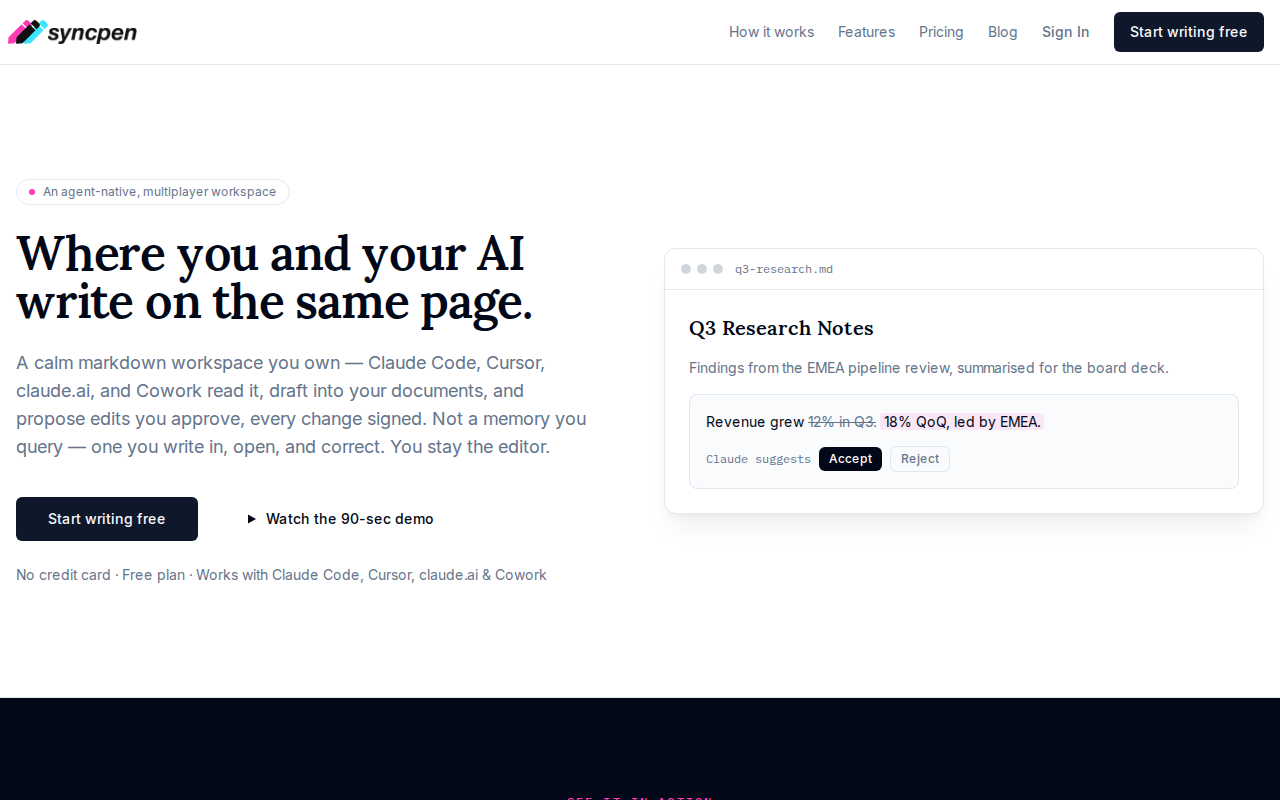
Most AI memory tools do RAG: retrieve, inject, generate. Syncpen flips it — the AI drafts directly into your Markdown, proposes edits, and you approve them like a PR review. That design choice turns 'memory' from a black box into a file you can open, read, and fix
Every AI edit is signed
Not just track changes — every edit is signed to its source (Claude Code, Cursor, claude.ai, Cowork), so you see exactly who wrote what and from where. Supporting bidirectional integration with four major AI tools takes serious interface work
「Not a memory you query — one you write in, open, and correct」
TECH GUESS
Likely React + a Markdown editor (Tiptap or ProseMirror), backend integrating multiple AI provider APIs, with change tracking probably using CRDT or OT
DEEP DIVE
\n## The Real Problem Isn't AI Writing Badly — It's Not Knowing What It Changed\n\nThe biggest pain point in AI-assisted writing isn't that the AI writes poorly. It's that you don't know what it changed. You ask Claude to polish a paragraph, and it might silently rewrite your core argument. You use Cursor to autocomplete a code comment, and it might alter a variable name without telling you. This \"AI quietly messing with your stuff\" anxiety stems from a lack of clear edit tracking. Syncpen addresses this exact issue: it lets you and your AI co-edit the same Markdown file, but every AI change must be approved by you, and every change is signed — telling you who wrote it and from which tool.\n\n## Not RAG Memory, But Editable Documents\n\nMost AI memory solutions today — whether vector databases or RAG pipelines — are fundamentally \"you query it.\" You have to figure out the right question to fish useful information out of a pile of fragments. Syncpen flips the model: it turns memory into a Markdown file you can open and edit anytime. Instead of being passively retrieved, AI actively writes drafts and proposes changes into your document. The developer, airbuzz, explained this philosophy on HN: \"Not a memory you query — one you write in, open, and correct.\" This design decision is restrained and aligns with the intuition that \"the document is the source of truth.\" Memory shouldn't be a black box; it should be the notebook on your desk that you can flip through and annotate at any moment.\n\n## A \"Bilateral Agreement\" with Four AI Tools\n\nSyncpen currently supports bidirectional integration with four tools: Claude Code, Cursor, claude.ai, and Cowork. This means you can not only let these AI tools read your Syncpen documents, but also have them write their proposed changes back — which you can then review one by one in the Syncpen interface. Aligning these four interfaces alone requires handling different API formats, authentication methods, and change proposal structures. According to the product page, every AI change is signed and tied to its specific tool source. This isn't simple Track Changes; it's more like a lightweight \"code review\" system — except the subject under review is natural language documents.\n\n## Who Should Use It?\n\nSyncpen's target user is clear: developers and product people who heavily rely on AI for writing, research, or code documentation and who care about document accuracy. If you frequently have AI draft, polish, or organize documents for you but worry it might \"quietly break something,\" Syncpen offers a middle-ground solution. It's not another AI writing tool; it's an \"AI collaboration editor\" — you retain final editing rights, and AI can only propose, not directly implement changes. It starts free with no credit card required, making it suitable for indie developers and small teams to try out.\n\n## Honest Limitations: It's Still Very Early\n\nThis project currently has only 2 points and 0 comments on HN, indicating it's very early-stage with virtually no community discussion. From the product page, it only supports four AI tools; if your team uses others (like GitHub Copilot or local models), you can't integrate them. Also, while it emphasizes \"edit traces\" and \"approval workflows,\" if you need AI's long-form generation capabilities, complex context management, or multimodal processing, it might not be the best choice. It's more of a \"safety layer,\" suited for scenarios where document accuracy matters more than generation speed. As the developer said, it's \"a memory you can open and correct\" — but the quality of that memory ultimately depends on you.", "status": "complete" }
Discussion (0)
- No comments yet — be the first.
Related
 #229▶ 136
Upload your textbook. AI teaches it back to you, chapter by chapter
 #228▶ 112
Someone needs to watch the AI spend meter
 #227▶ 184
Your users are kittens. Don't let them fall off the cliff