Claude MIDI Twister
www.dylanfisher.com/claude-midi-twister/ →Monitor Claude Code sessions on a DJ controller
WHAT IT SOLVES
Running multiple Claude Code sessions? You're tab-switching blind
WHY IT'S INTERESTING
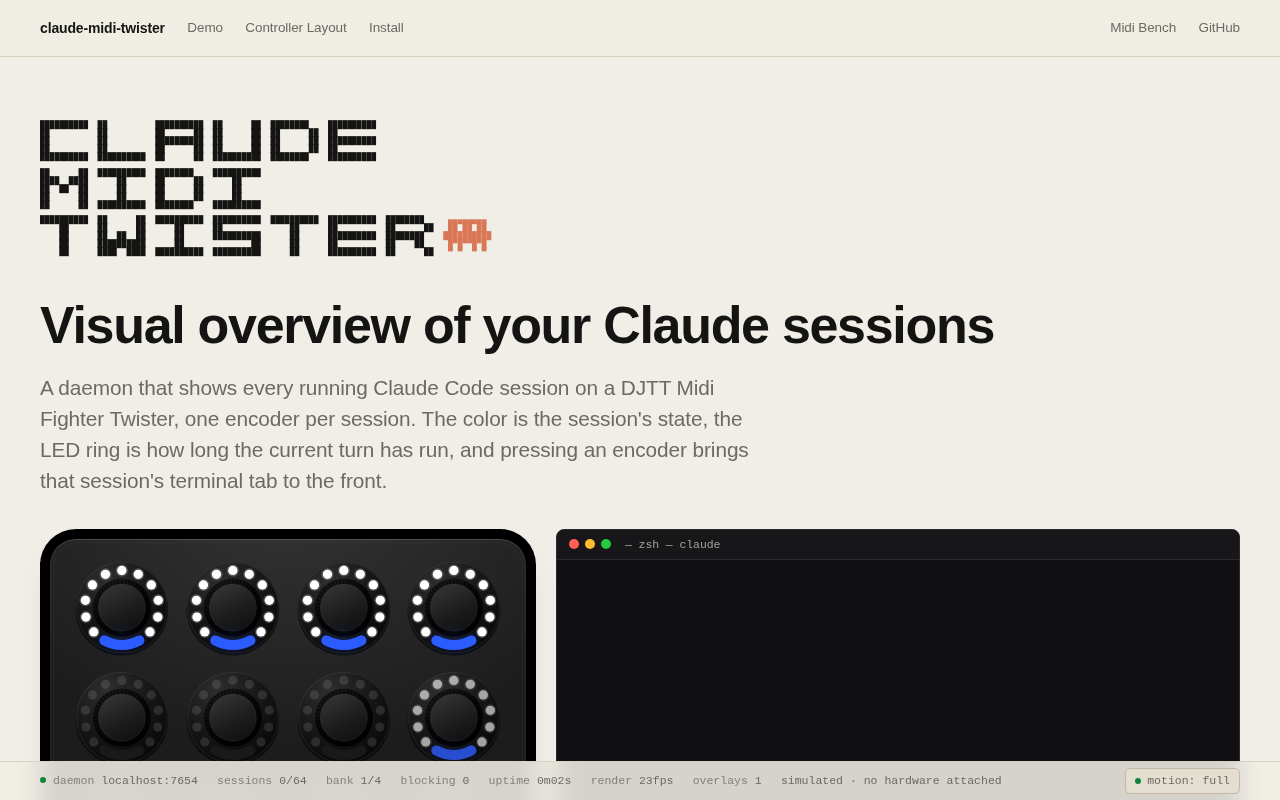
One encoder = one session
Color shows state, ring angle shows turn count, press to focus the terminal tab. Physical feedback without staring at a screen
Browser simulator included
The page has a working browser simulator of the Twister layout — you can play with it without buying hardware. Shows the author actually wants people to get it
TECH GUESS
macOS daemon talking MIDI to the hardware, monitoring Claude Code session state
DEEP DIVE
When AI Coding Meets a DJ Controller: Absurd but Surprisingly Practical
Picture this: you've got 10 Claude Code sessions running simultaneously—fixing bugs, writing tests, refactoring modules. Your screen is buried in terminal tabs, and the only way to know what's happening is clicking through them one by one. Dylan Fisher built a delightfully nerdy solution: a DJ controller on your desk where each knob maps to a session. Color tells you the state, rotation angle tells you how long it's been running, and a press jumps straight to that terminal tab. It's called Claude MIDI Twister. On HN, it got 1 point and 0 comments—but the pain point it addresses is very real.
What Problem Is This Actually Solving?
The "observability" of concurrent AI coding sessions is a massively underestimated pain. Claude Code, Cursor, Copilot Workspace—all support multiple simultaneous sessions, but their UI model is still fundamentally "one window, one task." You're flipping between tabs, relying on short-term memory to stitch together a global picture of progress. Fisher's approach is blunt and intuitive: abstract each session into three dimensions—state (color), progress (encoder rotation), and interaction (press)—then map them onto a physical controller with 16 knobs. Your hands are better at parallel perception than your eyes.
The Clever Hardware Choice
He picked the DJ Tech Tools Midi Fighter Twister—a controller designed for DJ mixing, featuring 16 rotary encoders with RGB LED rings, each clickable. MIDI natively supports state feedback (LED color and brightness are controllable from the software side), and on macOS, MIDI device driver support is essentially plug-and-play. This isn't some "hardcore hardware hacking project"—it's a daemon communicating with standard MIDI protocol to monitor Claude Code session states. The tech stack is surprisingly lightweight.
The Browser Simulator Matters More Than the Hardware
The page embeds a virtual Midi Fighter Twister—you can experience the full interaction logic in a browser without owning any hardware. This detail signals that Fisher actually wants people to understand and iterate on the idea, not just show off "look, I have a DJ controller." The simulator transforms the project from a "cool toy" into a distributable interaction paradigm. You can watch each knob's color and angle respond in real time, then decide if it's worth spending $200 on a controller.
Who Should Use This (and Who Shouldn't)
If you run 3+ Claude Code sessions daily and already own a MIDI controller (or just want a new desk toy), it's worth trying. But honestly, most people will find Cmd+Tab or iTerm2's tab management sufficient. The real value isn't the project itself—it's the question it raises: when concurrent AI agent sessions become the norm, what kind of "panoramic monitoring" does our toolchain need? Fisher offered one extreme but genuinely thought-provoking answer with a DJ controller.
Discussion (0)
- No comments yet — be the first.
Related
 #229▶ 136
Upload your textbook. AI teaches it back to you, chapter by chapter
 #228▶ 112
Someone needs to watch the AI spend meter
 #227▶ 184
Your users are kittens. Don't let them fall off the cliff