VideoClipper
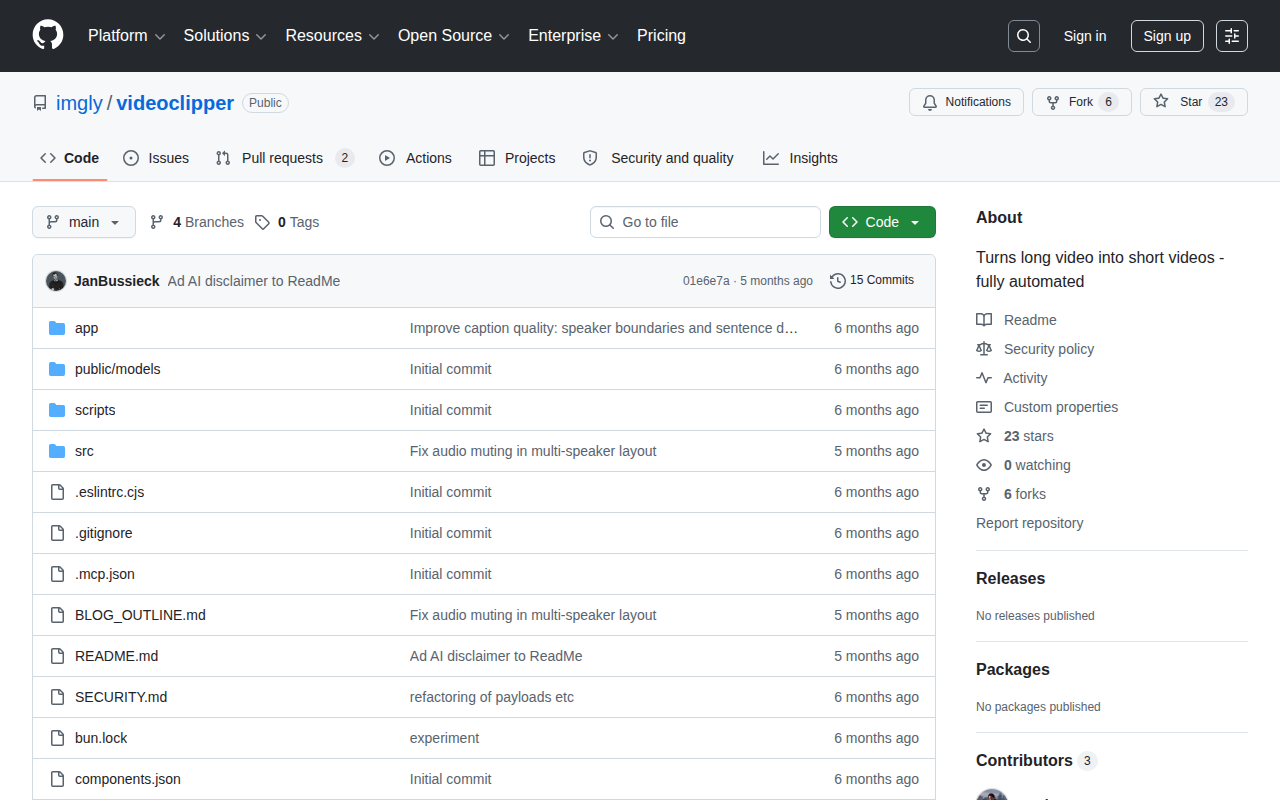
github.com/imgly/videoclipper →AI video clipping that never leaves your browser
WHAT IT SOLVES
Most AI video clippers want you to upload to their server, wait for processing, then download. You're always trading privacy for convenience
WHY IT'S INTERESTING
Models bundled client-side, zero server dependency
The AI models live in public/models and run entirely in the browser. No uploads, no waiting, no data leakage. imgly already makes editing SDKs — this time they went all-in on local-first
Captions aren't just transcription — they detect speaker boundaries
One commit specifically reads 'Improve caption quality: speaker boundaries and sentence detection.' Multi-speaker videos get properly segmented captions, not just blunt time-based cuts
「The author literally called it 'vibe-coded' in the HN title — no pretense, just built it while vibing」
TECH GUESS
Likely Whisper for speech-to-text running via WebAssembly or WebGPU in-browser; file structure suggests Vite + React
DEEP DIVE
Vibe-Coded and Browser-Only: A Video Clipper That Never Leaves Your Machine
buss_jan titled his HN post "Show HN: Vibe-coded AI video clipper that runs in the browser"—no pretense, just honesty. The post got 4 points and 0 comments, a quiet reception that speaks volumes about its niche appeal. VideoClipper's promise is straightforward: turn long videos into short clips entirely within the browser, with zero file uploads to servers. For privacy-conscious creators, this means your footage never leaves your device. The tool is open-source on GitHub (imgly/videoclipper), and its architecture is designed around local-first AI inference.
Under the Hood: Whisper, WebAssembly, and Speaker-Aware Captions
The presence of a public/models directory and .mcp.json file strongly suggests the AI models are bundled into the frontend. Technically, the most plausible path is Whisper for speech-to-text, running inference via WebAssembly or WebGPU directly in the browser. The framework looks like Vite + React based on the file structure—lightweight and modern. One commit message, "Improve caption quality: speaker boundaries and sentence detection," reveals a focus on nuanced subtitle generation. Unlike tools that slice captions by fixed intervals, VideoClipper detects speaker changes and segments text accordingly, which is a notable quality improvement for multi-speaker videos.
The Honest Limitations: Why 4 Points and 0 Comments Matter
The HN numbers—4 points, 0 comments—tell a story of indifference. Possible reasons: browser-based AI inference is resource-intensive. Whisper's full model is ~1.5GB, and running it locally demands decent hardware; most average users will experience lag. The README doesn't detail how the "automated clipping" algorithm selects highlights—is it scene detection, audio spikes, or something else? Without community feedback, the tool's reliability is untested. The author's silence after posting suggests low expectations for engagement; this feels more like an internal experiment than a polished release.
Who Should Actually Use This: Privacy Purists and Tinkerers
VideoClipper's ideal user is a video creator who refuses to upload footage to third-party servers—think corporate trainers handling sensitive meeting recordings or indie developers working with confidential content. imgly, known for its editor SDK, brings technical credibility here. If you're an independent developer who wants to manually tweak clips after AI-assisted transcription and segmentation, this is worth exploring. But if you expect fully automated, zero-touch editing, this version likely falls short. It's a tool for those who value privacy over polish and are willing to tinker.
Discussion (0)
- No comments yet — be the first.
Related
 #229▶ 136
Upload your textbook. AI teaches it back to you, chapter by chapter
 #228▶ 112
Someone needs to watch the AI spend meter
 #227▶ 184
Your users are kittens. Don't let them fall off the cliff